Polling Rate vs DPI: What Is the Difference?
DPI and polling rate are two separate mouse specifications. DPI describes how far the cursor moves per inch of hand movement. Polling rate describes how often the mouse reports its position to the computer. They do not depend on each other, and confusing them is common.
Want to check your mouse DPI? Use the free online DPI checker, then repeat the measurement 3–5 times for a reliable number.
Open the free DPI checkerWhat DPI measures
DPI, or CPI, is the number of counts the sensor reports per inch of physical movement. It sets how far the cursor or camera moves. See what is mouse DPI.
What polling rate measures
Polling rate is how many times per second the mouse sends updates to the computer, measured in hertz. A 1000 Hz mouse reports every 1 millisecond, a 500 Hz mouse every 2 ms, and a 125 Hz mouse every 8 ms. Some recent mice support 4000 Hz or 8000 Hz.
| Polling rate | Report interval |
|---|---|
| 125 Hz | 8 ms |
| 500 Hz | 2 ms |
| 1000 Hz | 1 ms |
| 8000 Hz | 0.125 ms |
Can you change them independently?
Yes. Most gaming mice let you set DPI and polling rate separately in software. Changing one does not change the other: raising polling rate does not move the cursor farther, and raising DPI does not make the mouse report more often.
Does a higher polling rate help?
It reduces the time between position updates, which can make cursor motion appear smoother and slightly lower latency. Gains beyond 1000 Hz are small for most people, and very high rates can use more CPU, so test what works well on your system.
How to Test Polling Rate and DPI
- DPI: estimate with the DPI analyzer and a ruler. See how to check mouse DPI.
- Polling rate: use the pointer event frequency tool in the mouse testing toolkit. Browser results depend on the browser and system, so treat them as approximate.
Polling rates and report intervals
| Polling rate | Time between reports | Typical use |
|---|---|---|
| 125 Hz | 8 ms | Older and office mice |
| 500 Hz | 2 ms | Power saving on some wireless mice |
| 1,000 Hz | 1 ms | Standard for gaming mice |
| 2,000 Hz | 0.5 ms | High-end wired and wireless |
| 4,000 Hz | 0.25 ms | Enthusiast mice |
| 8,000 Hz | 0.125 ms | Enthusiast mice, high CPU load |
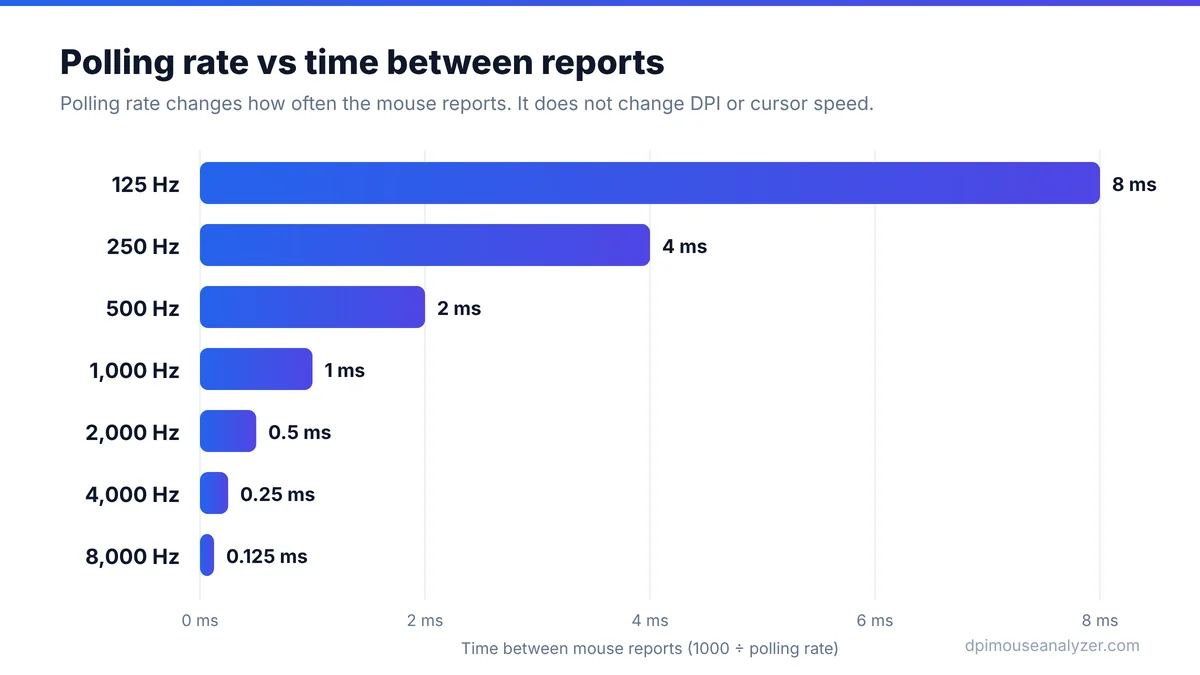
Going from 125 Hz to 1,000 Hz saves up to 7 ms per report, which is noticeable. Going from 1,000 Hz to 8,000 Hz saves less than 1 ms and needs a fast PC and a high refresh rate display to show any benefit.
The costs of very high polling rates
- CPU load: every report is processed by the system. At 4,000 to 8,000 Hz some games and PCs show frame drops or stutter.
- Battery life: wireless mice use much more power at high rates. Expect noticeably shorter battery life above 1,000 Hz.
- USB setup: high rates work best plugged directly into the PC, not through hubs or front-panel ports.
If you see stutter in a game after raising polling rate, step back to 1,000 or 2,000 Hz and test again.
Why browser polling tests can read lower than your setting
A web page cannot talk to the mouse directly. It counts pointer events from the browser, and browsers may group (coalesce) several reports into one event per screen frame. That is why our pointer event frequency test can show 500 to 1,000 Hz for a mouse set to 4,000 Hz. Use the test to spot problems, such as a mouse stuck at 125 Hz or one with big drops, not to certify an exact rate. For the configured value, check your mouse software.
Troubleshooting: is it DPI or polling rate?
| Symptom | More likely cause |
|---|---|
| Cursor suddenly faster or slower everywhere | DPI stage changed |
| Movement feels choppy or stuttery | Low polling rate, wireless interference or CPU load |
| Cursor jumps or shakes when still | Dirty sensor or surface; try the jitter test |
| Same speed, but feels delayed | Polling rate, frame rate or display latency |
Polling Rate and DPI: Quick Questions
Is 800 DPI the same as 800 Hz?
No. DPI measures movement per inch and Hz measures reports per second. They are unrelated settings.
Does 8000 Hz polling mean higher DPI?
No. Polling rate and DPI are independent. An 8000 Hz mouse can be set to any DPI it supports.
What polling rate should I use?
1000 Hz is a common, well-supported choice. Higher rates may help on capable systems but are not required.
Does polling rate affect eDPI?
No. eDPI uses DPI and sensitivity only. See what is eDPI.
Is 1,000 Hz enough for gaming?
Yes for almost everyone. Higher rates give smaller gains and use more CPU time and battery.
Why does a browser test show a lower polling rate than my mouse setting?
Browsers can combine several mouse reports into one event, so web tests often read lower than the hardware setting.