Best DPI for Valorant: eDPI, Sensitivity and cm/360
In Valorant, your mouse DPI and in-game sensitivity combine to decide how far your crosshair turns. Instead of copying a pro setting blindly, record your numbers, calculate eDPI and cm/360, and test how the setup feels in practice. This guide shows the formulas with worked examples.
Want to check your mouse DPI? Use the free online DPI checker, then repeat the measurement 3–5 times for a reliable number.
Open the free DPI analyzerCalculate your Valorant eDPI
eDPI = DPI × in-game sensitivity. For example, 800 DPI × 0.35 = 280 eDPI. This is a comparison number for Valorant setups, not a universal measure across shooters. See what is eDPI for the basics.
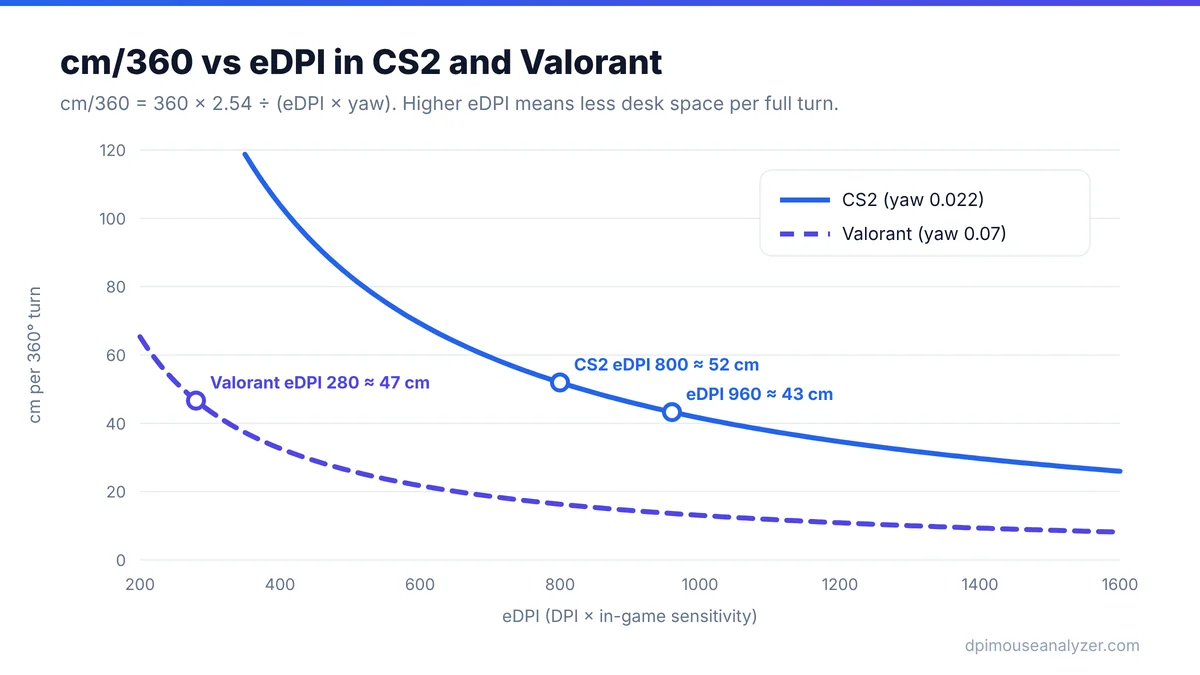
Calculate Your Valorant cm/360
Valorant uses a yaw value of 0.07 degrees per count at sensitivity 1. The distance to turn a full circle is cm/360 = 360 × 2.54 ÷ (DPI × sensitivity × 0.07).
| DPI | Sensitivity | eDPI | cm/360 (approx.) |
|---|---|---|---|
| 800 | 0.35 | 280 | 46.7 cm |
| 800 | 0.50 | 400 | 32.7 cm |
| 1600 | 0.25 | 400 | 32.7 cm |
| 400 | 0.70 | 280 | 46.7 cm |
Rows with the same eDPI give the same cm/360, which confirms that DPI and sensitivity are interchangeable within the game.
Convert a CS2 sensitivity to Valorant
The two games use different yaw values (0.022 for CS2, 0.07 for Valorant), so multiply a CS2 sensitivity by about 0.314 to get the Valorant equivalent at the same DPI. For example, 1.2 in CS2 is roughly 0.38 in Valorant. See the CS2 guide for the reverse.
Choose a controllable setting
Use the practice range and a consistent routine. Check whether you can track moving targets, make small corrections and turn comfortably without running out of mousepad. A larger cm/360 gives finer control but needs more space; a smaller one turns faster but is harder to aim precisely.
Change one variable at a time
If you change DPI and sensitivity together, it is hard to tell what helped. Record the starting values, change one setting, and evaluate over several sessions before changing again.
Verify your hardware setting
Make sure the DPI you use in the formula is real. Check it in your mouse software, or estimate it with the DPI analyzer and follow this guide. Also disable Windows pointer acceleration so movement stays 1:1.
Valorant mouse settings checklist
- Sensitivity: Aim - your main value. Combined with DPI it gives your eDPI.
- Scoped sensitivity multiplier - applied when you aim down sights or scope. The default of 1.0 keeps the same feel relative to the zoomed view; change it only if scoped shots consistently feel too fast or too slow.
- Raw Input Buffer - an option in Valorant's mouse settings that reads input in a different way and can feel smoother with high polling rates. Try it on and off and keep what feels consistent.
- Windows settings - Valorant uses raw input for aim, but keep Enhance pointer precision off so the desktop and DPI tests stay accurate (how to).
Change DPI without changing your Valorant feel
If you move from 800 to 1,600 DPI, divide your sensitivity by two. The formula is: new sensitivity = old sensitivity × old DPI ÷ new DPI.
| Old setup | New DPI | New sensitivity | cm/360 |
|---|---|---|---|
| 800 DPI × 0.35 | 1,600 | 0.175 | 46.7 cm |
| 800 DPI × 0.35 | 400 | 0.70 | 46.7 cm |
| 1,600 DPI × 0.20 | 800 | 0.40 | 40.8 cm |
Valorant accepts sensitivity to three decimal places, so you can match old setups exactly. Use the eDPI calculator and the cm/360 calculator to check the numbers before you load into a match.
Converting from other games
Conversions are based on each game's yaw (degrees turned per mouse count at sensitivity 1). Same DPI is assumed.
| From | Multiply by | Example |
|---|---|---|
| CS2 / CS:GO | 0.314 | 1.5 → 0.471 |
| Apex Legends | 0.314 | 2.0 → 0.629 |
| Overwatch 2 | 0.0943 | 5.0 → 0.471 |
Apex Legends uses the same yaw as CS2, which is why the multiplier is identical. A converted value is a starting point: field of view and scoped multipliers differ between games, so expect to fine-tune after a few sessions.
A 15-minute practice range routine to test a new sensitivity
- Turning (3 min): in the range, do full 180° turns to check you have enough mousepad without lifting the mouse.
- Static targets (5 min): shoot the bots on medium. If you keep overshooting, sensitivity is likely too high; if you keep stopping short, it may be too low.
- Strafing targets (5 min): switch bots to strafe and track them. Smooth tracking is a good sign the speed suits you.
- Deathmatch (2+ games): confirm the feel under pressure before deciding.
Repeat the routine for three or four days before changing again. One bad session is not enough evidence.
Valorant DPI: Common Questions
Is there one best Valorant DPI?
No. Player preference and the DPI and sensitivity combination matter more than a single number. Many players use 400 to 1600 DPI with a sensitivity that fits.
Can I compare Valorant eDPI with CS2 eDPI?
Not directly, because the games scale sensitivity differently. Convert using cm/360 or multiply a CS2 sensitivity by about 0.314.
Does Valorant use raw input?
Valorant is designed to read raw mouse input, so Windows pointer speed generally does not apply in the game. Turning off Enhance pointer precision is still recommended for a consistent desktop and for accurate DPI testing.
What is a good Valorant eDPI?
There is a wide range in use. Choose one that lets you turn comfortably and aim precisely, then keep it consistent while you practise.
How do I keep the same Valorant feel after changing DPI?
Multiply your sensitivity by old DPI divided by new DPI. For example, 800 DPI at 0.35 becomes 1,600 DPI at 0.175.
What does the scoped sensitivity multiplier do?
It scales your sensitivity while aiming down sights or scoped. Leave it at 1.0 unless scoped aim consistently feels wrong.